Network Kings, India’s Leading IT Career Training Academy
- Email: support@nwkings.com
- SCO 41-43, B Block, 4th floor, Chandigarh Citi Center




Looking for the best Red Hat Linux interview Questions and Answers? Red Hat Linux is a world’s leading Linux platform that is used by world’s top MNCs such as Twitter, Sony, Google, IBM, Juniper Networks, etc. In order to crack Linux administrative or Linux engineering roles in such companies, it is important to get prepared for Red Hat Linux interview.
This guide is your go-to when preparing for technical interview rounds. It covers over 30 Red Hat Linux interview questions and answers that can help you prepare to become an in-demand Red Hat Linux professional.
To make things easier for you, this guide is divided into two sections. These include:
- Red Hat Linux interview questions for freshers
- Red Hat Linux interview questions for experienced professionals
Without further ado, let’s now begin with the various red hat Linux interview questions and answers that you can expect to stumble upon in technical interview rounds.
Red Hat Linux Interview Questions and Answers for Freshers
1. What is meant by Red Hat Linux?
Linux is one of the most commonly used operating systems across the globe. It is even a more popular choice than a Windows operating system. Thanks to it being an open-source platform. On top of that, it is also a free and economical operating system.
Other important points include that it is user-friendly.
The Red Hat is one of the many distribution organizations of Linux operating system, and in fact, it is one of the most reliable one. It can do the following:
- It can help scale up existing applications.
- It helps to bring out new technologies such as containers, cloud, automation, virtual environments, SDKs, and microservices, etc.
2. What are some of the benefits of Red Hat Linux?
The following are some of the significant benefits of Red Hat Linux:
- Red Hat Linux is an open-source software.
- It offer a GUI (Graphic User Interface) Operating system.
- You can also access open-source technical support unlike other Linux distribution vendors that charge a hefty fee for resolving technical issues.
- It helps in completing basic command-line tasks.
3. What is meant by Red Hat network?
To conclude, Red Hat network is a system management platform. It particularly helios the users with an effective lifecycle management of various apps and operating systems. The other features of the Red Hat network include:
- Installing and setting up fresh Linux systems.
- Handling of configuration files.
- System reconfiguration for hosted and satellite deployment architectures.
- System updates.
- Performance evaluation.
4. How can you verify the uptime of a Linux server?
In order to verify the uptime of a Linux server, you can use command line. The best command is the ‘uptime’ command. By running this command, you get to know the time span of how long the Linux box ran. Other commands you can use include:
- w command
- top command
5. How can you rename a file in Red Hat Linux?
You can follow the below mentioned steps to rename a file in Red Hat Linux:
- First of all, open the Linux shell command line.
- Use the “mv” command in the command line interface.
- This program will showcase both the orginical and newly named files/
- It is important to double-check all the parameters before renaming the files.
- Sometimes, a user forgets to check few parameters. In such cases,, the command prompts you to recheck them.
6. What is a puppet server?
A server that use an operating system similar to Unix is known as a puppet server.
This business application is great for managing setups overall.
The significant functionalities of the puppet server includes the following:
- This application is 100% open-source and fully automated, to be more precise.
- This enables you to use codes to communicate instructions to puppet agents.
- Puppet code can be used for a variety of tasks, including updating user accounts, checking the rights on files, and installing new software.
7. What is meant by LILO?
A Linux boot loader is called LILO. It is primarily used to start the Linux operating system’s activities by loading it into main memory.
8. What is meant by SELinux?
SELinux is an acronym for Security-Enhanced Linux. As the name suggests, it provides protection to the server against any malicious activities such as misconfigurations or hacked daemons. Security policy specifies the procedures that must be followed and is used to establish limits and instruct server applications on how to access certain or permission-granted files.
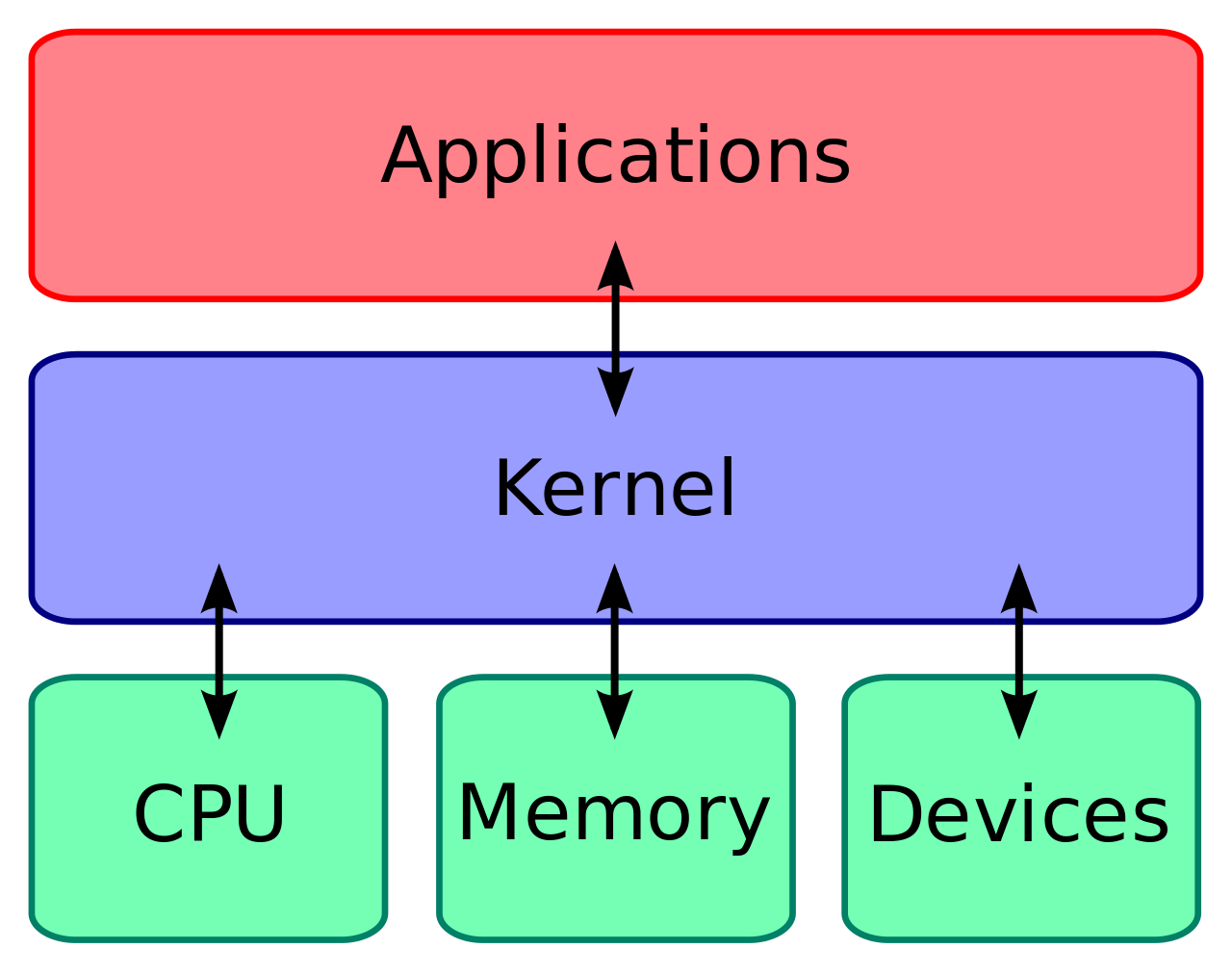
9. What do you understand by Linux Kernel?
The heart of Linux operating systems is the Linux Kernel. The main goal of the Linux Kernel, a low-level piece of systems software, is to manage hardware resources on behalf of the user. Additionally, it serves as a user interface for interactions at the user level.
10. How can you change the User Password?
Users can modify their passwords by using the command “passwd”. The command must be executed through the prompt while the current password is being input. Type the new password next and you are good to go!
11. Mention the basic components of Linux.
The following are the main components of Linux:
- Linux kernel
- Shells
- Graphical User Interface (GUI)
- System utilities
- Application program
12. What do you understand by CLI?
Command Line Interface, or CLI, is an abbreviation. With the use of this interface, a user can order the computer to do actions by typing logical commands. CLI provides more versatility. However, some users who are already familiar with using GUI find it challenging to remember instructions and associated attributes.
13. What are the different types of Linux user modes available?
There are two main types of user modes available:
- Graphical User Interface (GUI)
- Command Line Interface (CLI)
14. How can you open a command prompt to pass a command?
You can follow the following quick steps to open the command prompt:
- The command prompt is present in the default shell.
- You need to press Ctrl-Alt-F1. If you’re using a Mac, you can also use the Terminal app to run the bash scrips.
- Voila! You can then access the command line interface (CLI) where you can run all the commands you need.
15. Which is more secure: Windows or Linux? And Why?
Linux Operating systems are more secure as compared to the Windows operating system. The reasons are mentioned below:
- The Linux operating system offers a number of working environments, all of which contain virus protection, such as Linux Mint, Debian, Arch, and others.
- In order to rapidly view the specifics of the system files afterwards, it keeps a log history.
- A Linux feature called Iptables looks at the system’s security perimeter.
- Security will be improved because there are less people using Linux than other operating systems.
- A small number of persons have access to the Linux system. As a result, the virus can only possibly harm a small number of files rather than the entire system.
- Linux users must finish the steps before accessing the files in order to safeguard their systems from vulnerabilities.
16. What are the various available run levels in Linux?
The various run levels that are present in Linux are mentioned below:
- System of halt (attempted system shutdown)
- There won’t be an NFS option, but there will be a multi-user option.
- Setting for individual users
- The whole multi-user mode (based on the text)
- Graphical user interface mode for numerous users
- Unused
- Launch the computer again
17. How can you install rpm packages?
We can install the rpm packages by using the command line. It could easily be installed in Red Hat Linux operating system by using the yum and rpm command lines.
18. What is meant by load balancing cluster?
The concept of load balancing cluster could be understood from the following pointers:
- The cluster for load balancing is used to distribute the load among the cluster nodes.
- When the cluster sends the service request to a different cluster node, it functions.
- Because additional nodes can be configured taking into account the load needs, this cluster offers reasonably priced scalability.
- If a node in this cluster experiences a problem, it will identify the issue and then distribute the necessary requests among the available nodes. This way, the node’s collapse won’t be observable from outside the cluster.
19. What us a storage cluster?
When a task is performed by a collection of two or more computers, those are known as clusters. The various clusters are mentioned as follows:
- High availability
- High performance
- Load balancing
The main features of the storage cluster are:
- A storage cluster in particular offers a consistent and ideal view of the file systems on the servers included in the group.
- It enables servers to read from and write to a shared file system simultaneously.
- Additionally, it enhances storage administration by streamlining and limiting the application installation and packaging process.
20. How can you know which version of Red Hat are you using?
Using the ‘cat /etc/Redhat-release‘ command, you may find out the Red Hat version.
Red Hat Linux Interview Questions for Experienced Professionals
21. What is meant by hard links?
Hard links are only another term for existent files in the Linux operating system. We can create an infinite number of hard links for each file. They are capable of creating ties for other challenging connections. Hard links don’t reference the pathname; instead, they point to the actual file on the disc.
The ‘Is-I’ command can be used to count all of a file’s hard links.
If you’re wondering how to create hard links using command line, you can use the following command:
$ ln [original filename] [link name]
22. Can you name different types of Linux directory commands and explain each one of them?
There are 5 main types of Linux directory commands you can utilize to work with various files as well as directories. These commands are mentioned below:
- cd:
“Change directory” is referred to as “cd.” This command is used to switch the current working directory to the desired directory. This command’s syntax is $ cd path to new directory>.
- pwd:
The term “print working directory” (pwd) is used. This command shows the location of the active working directory. This command’s syntax is $ pwd.
- mkdir:
“Make directory” is what the acronym mkdir stands for. In Linux, we use this command to create folders. This command’s syntax is $ mkdir name (and path, if necessary) of new directory>.
- rmdir:
“Remove directory” is what rmdir stands for. Any directory on the command line can be removed or deleted with this command. This command’s syntax is $ rmdir name (and path, if necessary) of directory.
- Is:
ls stands for “list”. To examine the whole list of files and directories in the currently open working directory, we use this command. This command’s syntax is $ ls.
23. Can you explain the process of creating LVM in Red Hat Cluster?
In order to create LVM in Red Hat Cluster, you can follow the steps mentioned:
- Run the command “pvcreate /dev/sda2” (#pvcreate /dev/sda2) to achieve this.
- Once the volume cluster has been built, the real volume must be added to it.
- Here, the command “vgcreate VLG0 /dev/sda2” (#vgcreate VLG0 /dev/sda2) could be used.
- From the volume cluster, create the required volume right away.
- Using the command “#lvcreate -L 1G -n LVM1 VLG0,” In the final stage, users must issue the “mke2f” command (#mke2fs -j /dev/VLG0/LVM1) to build a file system on Sda2.
24. What is meant by pwd command?
The pwd command stands for print working directory command. By using the ‘pwd’ command, you can print the full path name of the working directory right from the root. For example,
/usr/bin/pwd is a pwd command.
25. What is meant by DASDs?
- Expanded as Direct access storage devices (DASDs), these are either fixed or removable storage devices.
- Most commonly, DASDs are physical devices such as solid state disks or rotating disk drives.
- DASDs are economical and easy to use.
- CD-ROM, DVD, and WORM (write-once read-many) are the types of devices that are not considered as DASDs and are not supported by Logical Volume Manager (LVM).
26. What are the type of remote software users you can use to encrypt the communication?
A dependable remote desktop platform known as the SSH can be used to encrypt the communication. It allows users to manage the Red Hat server without being physically present there. You can use various commands to control it.
27. What is meant by Virtual File Systems?
The v-node interface, sometimes referred to as the virtual file system (VFS) interface, serves as a link between the logical and physical file systems.
The two main parts of the VFSs are as follows:
- Logical file system:
It provides support to the call interface of the system.
- Physical file system:
It allows the user to manage permanent storage of the data.
So, in other words, the interface between the logical and physical file systems is called the virtual file system interface or the v-node interface.
28. Can you name any 4 general password rules for a User account?
The important password rules for User account are mentioned below:
- Include a total of at least eight characters.
- You should employ a string in a novel way.
- You must not frequently use birthdays and anniversaries.
- Don’t overuse words that can be found in a dictionary.
29. How can you append one file with another?
The operator “>>” can be used to append a named file with another file. To append 2 files together, the following command can be used:
cat file 3 >> cat file 4
In order to append more than 2 files, you can use the following command line:
cat file 4 > cat file 5 > cat file 6
Notice how the operator “>” is used to append more than two files.
30. What are the main types of Linux shells?
Before knowing the different types of Linux shells, it is important to know what a shell is! A shell is a software that acts as a user interface. It connects the user with the Linux kernel. You can write instructions and programs in the shell in order to talk to the Linux kernel.
There are 5 types of shells in Linux:
- CSH (C Shell)
- BASH (Bourne Again Shell)
- ZSH(Z Shell)
- KSH (Korn Shell)
- TCSH (Tenex C Shell)
Wrapping Up:
In conclusion, if you’re extremely serious about acing Red Hat Linux interviews, Our specialized Red hat Linux course is your key to success. With our hands-on training and professional guidance, you’ll not only master the operating system but also gain the confidence to excel in interviews. Don’t miss this possibility to propel your career forward – Join in Red Hat Linux training today!