Network Kings, India’s Leading IT Career Training Academy
- Email: support@nwkings.com
- SCO 41-43, B Block, 4th floor, Chandigarh Citi Center




The difference between Windows and Linux Operating systems is a necessity for every IT enthusiast. Though both are operating systems, both have different Pros and Cons. Every IT professional must know the exact use of these operating systems. Windows is commercial software and Linux is open-source software. You must know which operating system will suit your need. This blog will highlight the difference between Linux and Windows and the essentials of Windows and Linux.
What is Windows Operating System?
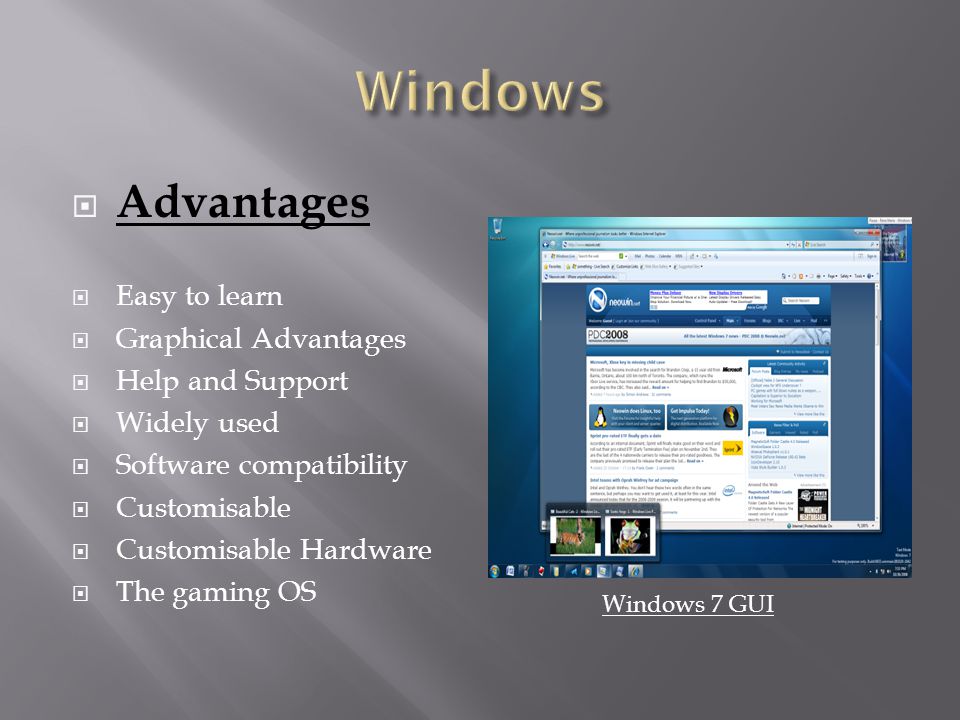
Microsoft Windows Operating system is one of the systems on the ground since 1985. It came in the form of a Graphical User Interface or GUI on the MS-DOS or Microsoft Disc Operating System. Windows users can use it to read and store files, run apps, play games, watch videos, and connect to the internet. Windows is usable both professionally and personally.
Windows is developed by Microsoft Corporation. Windows was mainly for IBM- compatible PCs. 90% of the users use Windows on their personal computers. The first version of Windows was the Windows XP. Now, the latest version of Windows is Windows Home and Professional. Windows Home is pre-installed on most devices. Windows Home allows web surfing, Internet connection, video game play, office software use, and video viewing.
Windows Professional or Windows Pro is a powerful version of Windows. It is helpful for small to medium companies. It provides Remote Desktop, Hyper – V, Bitlocker, and Trusted Boot.
What is the importance of the Windows Operating System?
The importance of the Windows Operating system is:
User-Friendly: Windows has such a design that every user with basic computer knowledge can use it. It is based on Graphical User Interface or GUI and the computer screen is quite adaptable.
Suitable for all Hardware: Windows is a popular operating system and is compatible with all types of hardware.
Plug and Play: Windows has an automatic plug-and-play feature. It detects the hardware device and plays it. The user does need not to download the driver manually.
Applications Development: Windows permits easy application development. It is suitable for software developers. It allows to develop games, utilities, and other applications.
Touch and Desktop: Windows is available both with touch and desktop. This is the biggest advantage of Windows.
What is Linux Operating System?
Linux Operating system is Unix-like, an open-source system developed by the community. It is mainly for computers, mainframes, mobile, and embedded devices. It supports vital computer platforms, like x86, ARM, and SPARC. Linux is capable of managing hardware resources, initiate manage applications, and forms of user interface. The large community and range of distributions make Linux available for almost every task.
The Linux OS comes in different servers, like Server OS, Headless server OS, Desktop OS, Embedded device or appliance OS, Network OS, Software development OS, and Cloud OS.
Linux allows its users to customize the versions of Linux. Based on the application, Linux is used for networking performance; computation performance; deployment on specific hardware platforms; and deployment on systems with limited memory, storage or computing resources.
Before knowing the difference between Linux and Windows, let us know what is Linux. Click on the link below to know it.https://www.youtube.com/watch?v=bJ–6AiD2Go&t=151s
What are the components of Linux?
There are seven components of Linux and they are
Bootloader: A bootloader in Linux OS manages the boot system and starts the Linux kernel. Bootloader can manage more than one Operating system.
Kernel: The kernel is the core of the Linux system and it manages network access, schedules processes or applications, peripheral devices, and file system services. The Linux kernel links directly with the computer hardware.
Init systems: Init is the first process after we load the kernel in our system. The init system comes under the Daemon category and it is responsible for managing all other processes on the system. The Init system is the parent system of all other systems working on the Linux OS. When the system runs, the Init system loads all necessary web server software.
Daemon: A Linux web server depends on Daemon, called httpd that listens to web server requests. Daemon is a component of Linux that runs in the background to manage the server’s requests.
Graphical server: The graphical server manages the displaying of the graphics on the computer. If the graphical server is not present, users link with the Linux system via a command-line interface. A common graphical server for the Linux system is X Windows system or X11 or X. The applications use it when they require graphical output. X works on the system as a server daemon.
Desktop environment: The desktop environment allows the users to interact with each other. The desktop environment is the collection of applications and user interface controls. Access to the desktop environment system is in the hands of X Window System or another graphical system. The desktop environment also includes default applications to handle files and folders, text editing, running a command-line session, and other common tasks.
Applications: Applications are installed on and after the time of Linux installation. Almost every Linux distribution comprises various Linux applications for networking servers and desktop use.
What is the importance of the Linux Operating System?
Linux Operating system is important for IT enthusiasts and they are
Open-source: The Linux system is of open-source nature as it was inaugurated under GNU GPL open-source software license. Many distributions of Linux include proprietary software, like device drivers by manufacturers to provide support to their hardware.
License cost: Linux does not charge any licensing cost. Many vendors charge for the system support, but Linux OS is free of cost and it is permitted to be copied. It is beneficial for IT firms to switch to Linux from their commercial OS to enjoy free services.
Reliability: Linux OS is quite reliable as it comes with security patches. Linux is a stable OS as it can survive many circumstances. Linux handles unexpected errors in the running software as well.
Backward Similarity: When there is a need to retain core functionality, the user needs to update Linux for security patches. With software updates, the configuration and the shell scripts do not get changed. Linux does not change its way of operation like other Operating Systems.
Flexibility: With the thousands of distributions, and applications, configuring, compiling, and running Linux on any hardware platform, Linux works on every application.

What is the difference between Linux and Windows?
|
Criteria |
Linux |
Windows |
|
Meaning |
Linux is an open-source operating system for desktops. |
Windows is not an open-source operating system. |
|
Developer |
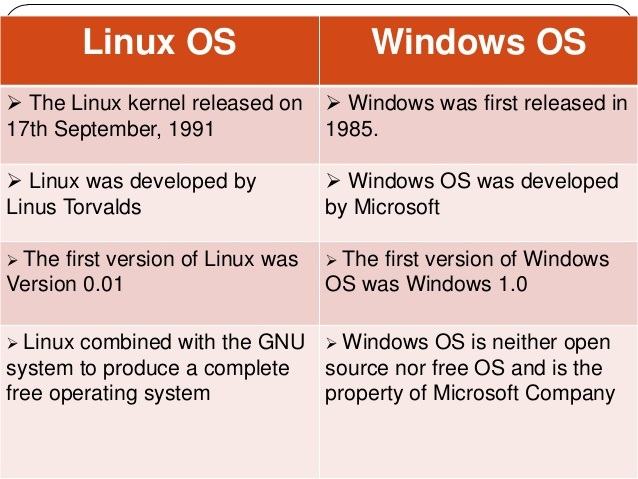
Linux is developed by Linux Torvalds. |
Windows is developed by MICROSOFT. |
|
Availability |
Linux is open-source and free. |
Windows is a paid operating system. |
|
Usage |
Linux has machine-friendly features and the user must learn to use Linux. |
Windows uses Graphical User Interface and any non-technical user can use it without getting into tech-knowledge. |
|
Kernel-type |
Linux is based on a Monolithic kernel. |
Windows is based on Microkernel. |
|
Path distinguisher |
Forward slash is the path distinguisher. |
Backward Slash is the path distinguisher. |
|
Safety |
Linus possesses better safety measures than Windows. |
Windows is less safe than Linux. |
|
Case sensitivity |
Linux is less case-sensitive. |
Windows is not case-sensitive. |
|
Updates |
Linux updates less frequently. |
Windows has frequent updates. |
|
Language |
Linux is written in C and Assembly language. |
Windows is written in C++ and Assembly language. |
|
License |
Linux is initiated under General Public License. |
Windows is initiated under a Proprietary commercial software license. |
|
Reliability |
Linux is more reliable due to its high security. |
Windows is less reliable than Linux. |
|
File system |
Linux uses a tree structure to manage files. |
Windows uses directories such as C, D, E, and more, and folders are used to store files. |
|
Users-types |
The types of users in Linux are administrative, regular, and service. |
The types of users in Windows are Administrator, Child, standard, and Guest. |
|
Speed |
Linux has more speed than Windows. |
Windows has a slow speed than Linux. |
|
Command-line |
Linux has a command line called a terminal that performs various tasks. |
Windows also has a command line which is less useful than a terminal. Users have to use GUI to complete their tasks. |
|
Installation |
Linux takes less time to install but we need professionals for the set-up. |
Windows takes more time to set up, but anyone can manage the installation. |
NOTE: After seeing the difference and the need for a secure system, Linux is much better than Windows. If you are seeking a bright future in Linux, you must pursue your career in Linux. To get Linux-certified, you can enroll for Linux training at Network Kings. Below listed are the working model and the procedure to start your career in Linux.
What is the working model of Linux?
Linux works with the kernel. Every Linux OS has a kernel in common. Here are the steps for working with Linux:
- The first step is to boot and load Linux.
- After booting, the kernel will manage the output and input system.
- Now, the system is initialized and the process is started.
- The system is ready for network server functions, commands via the command line, and desktop applications.
Linux use cases with various user-experience, like desktop productivity, network servers, and thin clients. When we use Linux as a GUI-based desktop environment, it works the same as GUI-containing Operating System. We can open applications with just a click on the icons, and the files are movable, copied or deleted with the help of a mouse or a trackpad.
Why pursue a Linux Certification course?
Getting a Linux Certification is essential in the industry as it will increase your roles and responsibilities for your career advancement. Linux certification will prove that you have the apt knowledge of the Linux Operating system. Linux-certified students can get a chance to work in the high-end technological era. Linux knowledge will boost the company’s chance of identification and promotion chance. Linux, due to its open-source management is highly in-demand. Hence, it possesses a bright future. Companies are seeking open-source and less expensive Linux Operating systems.
Where to enroll for Linux Certification Course?
Choosing the best Linux training certification center is difficult. Hence, your search for the best Linux Training Center is over. You can trust Network Kings blindly for the best learning material online. You will learn
- Developing shell scripts
- Manage Running system
- Configure local system
- Prepare and deploy File systems
- Deploy, configure, and mount the system
- Manage basic networking
- Industry users and groups
- Addresses security
- Preside containers
- Understand essential tools
Why Network Kings for Linux Training?
Network Kings offer advantages like:
- The students can learn from industry professionals at Network Kings.
- Understanding these industry specialists will enable the scholar to discover the best.
- The learners can get practical knowledge with real-life examples.
- Linux learning is reasonable at Network Kings.
- You can study basic to advanced courses in every profession.
Note: Click here to discover more about Network Kings.
What skills will you learn in the Linux training course?
The skills one will acquire with the Linux training:
- Account Management
- Structured Query Language
- Network traffic packet capture
- vi editing
- Backup and restoring
- Hardware setup troubleshooting
- Network routers and firewalls
- Network switches
- SIEMs and Monitoring systems
- Interviewing and other interpersonal skills
What are the eligibility criteria for Linux Training?
Here are the eligibility criteria for Linux training:
- For Linux training, Graduation is a must.
- Linux training in Graduation asks for essential learning of Information Technology.
- Understanding computer networking is compulsory for Linux training.
- Understanding Transmission Control Protocol and Internet Protocol is mandatory for Linux training.
What are the exam details of the Linux Training Course?
Listed below are the exam details of Linux training:
To clear RHCSA certifications, the student should clear the EX200 exam. Here are the details of the RHCSA certification exam.
Exam Name: Red Hat Certified System Administrator (RHCSA) exam
Exam Code: EX200
Exam Cost: USD 400
Exam Format: Lab-based practical questions
Total Questions: 20-25 questions
Passing Score: 210/300
Exam Duration: 150 minutes
Languages: English, Japanese, Korean, and Simplified Chinese
Testing Center: Pearson VUE
Here are the exam details for RHCE:
RHCE includes three exams: EX294, EX298, and EX300.
EX294: Exam Name: Red Hat Certified Engineer (RHCE)
Exam Code: EX294
Exam Cost: USD 400
Exam Format: Performance-based questions
Total Questions: 15-20 questions
Passing Score: 210/300
Exam Duration: 4 hours
Languages: English, Japanese, Korean, and Simplified Chinese
Testing Center: Pearson VUE
EX298: Exam Nam: Red Hat Certified Engineer (RHCE)
Exam Code: EX298
Exam Cost: $400 + applicable taxes
Exam Format: Performance-based questions
Total Questions: 15-20 questions
Passing Score: 210/300
Exam Duration: 4 hours
Languages: English, Japanese, Korean, and Simplified Chinese
Testing Center: Pearson VUE
EX300: Exam Name: Red Hat Certified Engineer (RHCE)
Exam Code: EX300
Exam Cost: $400 + applicable taxes
Exam Format: Performance-based questions
Total Questions: 10 questions
Passing Score: 210/300
Exam Duration: 3.5 hours
Languages: English, Japanese, Korean, and Simplified Chinese
Testing Center: Pearson VUE
- Understanding essential tools
- Developing shell scripts
- Manage Running system
- Configure local system
- Prepare and deploy File systems
- Deploy, configure, and mount the system
- Manage basic networking
- Industry users and groups
- Addresses security
- Preside containers
Note: For more details, download the Network Kings Brochures.
What are the job opportunities after the Linux Training?
The job opportunity in the Linux training are:
- Linux System Administrator
- Linux Network Administrator
- DevOps Engineer
- Cloud Engineer
- Site Reliability Engineer
- IT Support Engineer
- Security Analyst
- Software Developer
- Database Administrator
- IT Manager
- System Engineer
- Virtualization Engineer
- Storage Administrator
- Automation Engineer
- Network Engineer
- Infrastructure Engineer
- Technical Support Engineer
- IT Consultant
- Quality Assurance Engineer
- Penetration Tester
What are the salary aspects after the Linux Training?
Here are the vibrant Linux salary according to various countries:
- United States – USD 70,000 – USD 150,000 per year
- Canada – CAD 60,000 – CAD 120,000 per year
- United Kingdom – £35,000 – £70,000 per year
- Germany – €45,000 – €90,000 per year
- France – €35,000 – €70,000 per year
- Australia – AUD 75,000 – AUD 120,000 per year
- New Zealand – NZD 60,000 – NZD 100,000 per year
- United Arab Emirates – AED 90,000 – AED 200,000 per year
- India – INR 500,000 – INR 1,500,000 per year
- Singapore – SGD 60,000 – SGD 120,000 per year
- Hong Kong – HKD 350,000 – HKD 700,000 per year
- Japan – JPY 5,000,000 – JPY 10,000,000 per year
- South Korea – KRW 40,000,000 – KRW 80,000,000 per year
- Brazil – BRL 60,000 – BRL 120,000 per year
- South Africa – ZAR 200,000 – ZAR 600,000 per year
NOTE: To know why Linux is better than Windows, refer to the video below!https://www.youtube.com/watch?v=asmi21Tc5ns
Conclusion
In Conclusion, the blog “Difference between Linux and Windows,” has mentioned the characteristics, scope, working, strength, and usage of both these operating systems. Linux and Windows are developed by different developers and have different uses. The user must know which of these will suit their requirements well. But after watching the difference and understanding Linux and Windows separately, one can see more benefits with Linux than Windows. IT organizations need high-security OS and Linux can manage that security.
To start a career in Linux, the student needs to get Linux certified. You can pursue the Linux training course with professional engineers at Network Kings.
I hope this blog has helped you understand the difference between Windows and Linux.